
Zhiyou Accelerator User Guide
From download and installation to advanced tips, master all the key points for stable acceleration in one article
I. What is Zhiyou Accelerator
Zhiyou Accelerator is a network optimization tool for gamers. Through intelligent routing and dedicated line relay technology, it reduces game latency, packet loss, and stuttering, providing a more stable connection experience for cross-region and cross-server gaming. It does not modify the game itself or involve account data; it only focuses on optimizing the network link between you and the game server.
II. Applicable Scenarios
Cross-region gaming
When playing on foreign or remote servers, direct connections have high latency and fluctuations.
Peak hour lag
Evening network congestion causes disconnections and ping spikes.
Online multiplayer battles
Latency-sensitive competitive games require more stable connections.
Multi-device sharing
Consoles, PCs, phones, and other devices need separate acceleration.
III. Download and Installation
Obtain the installer
Go to the official Zhiyou Accelerator website and download the version corresponding to your device system (Windows, macOS, Android, iOS, or console). Be sure to obtain it from official channels and avoid using installers from unknown sources.
Install the program
Double-click the installer and follow the prompts to complete installation. If firewall or security software prompts appear during installation, select "Allow" to ensure the accelerator can establish network connections properly.
Launch and log in
Open the client and log in with your phone number or account password. First-time use usually requires registration and verification.
IV. Basic Usage Steps
Select a game
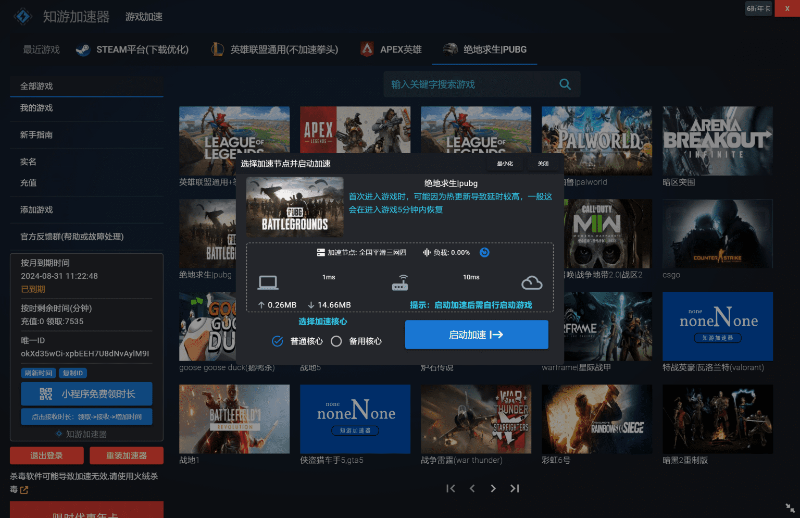
Enter the game name in the client's search box and select the game and corresponding server you want to accelerate from the list.
Select a node
The system recommends nodes with lower latency, but you can also switch manually. It is recommended to prioritize "Smart Recommendation" or the node with the lowest latency value.
Start acceleration
Click "One-click Acceleration" and wait for the connection to establish. After successful acceleration, the client will display the current latency and connection status.
Launch the game
Keep the accelerator running, then launch the game through the client or platform to enjoy the acceleration effect.
Stop acceleration
After the game ends, click "Stop Acceleration" to release network resources.
V. Advanced Tips
Compare multiple nodes
Try different nodes for the same game; actual experience may vary by ISP and time of day. Try several to find the most stable one.
Server matching
Ensure the accelerated server matches the server you actually log into in the game, otherwise acceleration will be ineffective.
Console acceleration
Console players can enable "Console Acceleration" mode on the PC client, follow the instructions to point the console's network to the accelerator, and then complete networking on the console.
Router mode
Some versions offer "Router Mode," suitable for multiple devices or scenarios where the client cannot be installed. Configure it according to the official tutorial.
VI. How to Use Zhiyou Accelerator for Free
Many players wonder if they can experience acceleration without spending money. Zhiyou Accelerator offers various free methods; with reasonable use, you can get started at zero cost.
Free trial for new users
New users receive 300 minutes of usage time by default. After using it up, you can claim more for free via the Zhiyou Accelerator mini-program. The specific duration is subject to the activity page displayed in the client.
How to claim for free
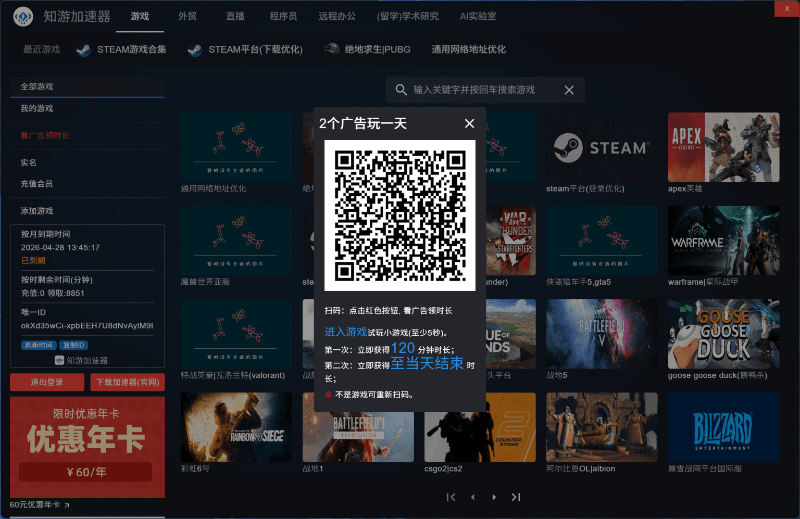
When you log in to the Zhiyou Accelerator client, a QR code for claiming free time will pop up. Scan the code and view ads to obtain free time; generally, viewing 2 short ads grants one day of time. Don't worry about not getting free time due to lack of ads—even if there are no ads, a fallback of 120 minutes of free time will be granted.
Limited-free games and time periods
Some games or specific time periods offer free acceleration, marked with a "Limited Free" label in the client. Prioritize these games to use them for free during the corresponding periods.
Official events and redemption codes
Follow Zhiyou Accelerator's official announcements, communities, and holiday events, which often distribute experience redemption codes. Enter them in the client's redemption entry to get free time.
Plan your trial rhythm wisely
Free time is limited. It is recommended to use it first to test node quality and stability, and after confirming it suits your network environment, then decide whether to purchase a package to avoid blind payment.
Note:Free time usually has claim conditions and usage periods; please refer to the actual rules in the official client. Do not trust third-party "cracked versions," "permanently free," or other versions from unknown sources to avoid damage to account and device security.
VII. Common Issues and Troubleshooting
❓ Latency still high after acceleration
Try changing nodes, check whether your local network is stable, or avoid network peak hours.
❓ Unable to connect/acceleration failed
Confirm that the firewall is not blocking the accelerator, try restarting the client, or run as administrator.
❓ Game disconnections
Check whether other network proxy tools are enabled simultaneously to avoid conflicts.
❓ Account and billing issues
Check your package and duration in the client's "Personal Center." If there are anomalies, contact official customer service.
VIII. Usage Precautions
- ✓ Download only from official channels and beware of counterfeit software.
- ✓ The accelerator only optimizes network links and does not provide game accounts or boosting services or other violations.
- ✓ Use it for reasonable durations and pay attention to eye care and rest.
- ✓ If persistent anomalies occur, promptly report to official customer service and keep relevant logs for troubleshooting.
IX. Conclusion
The core value of Zhiyou Accelerator lies in "stability" and "peace of mind." Mastering the three steps of selecting a game, selecting a node, and starting acceleration, combined with advanced tips and troubleshooting methods, can basically handle most cross-region gaming network issues. It is recommended to start with smart recommended nodes and make good use of free channels such as new user trials, check-in tasks, and limited-free events to gradually figure out the configuration that best suits your network environment.